AI Therapy Progress Notes: Private, Local, No Cloud
You don’t have to sacrifice confidentiality to automate your progress notes.
Your sessions stay on your computer, where they belong.
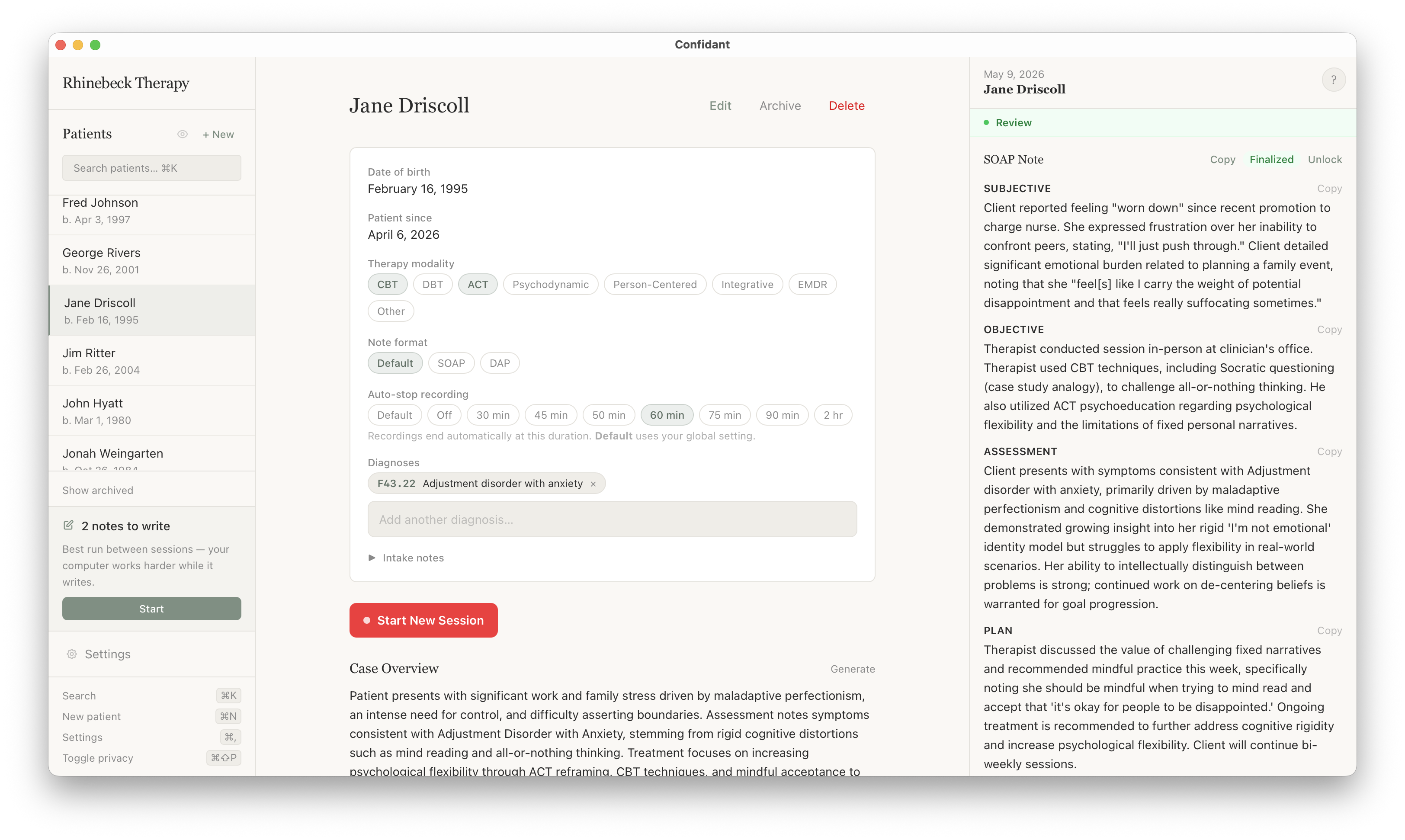
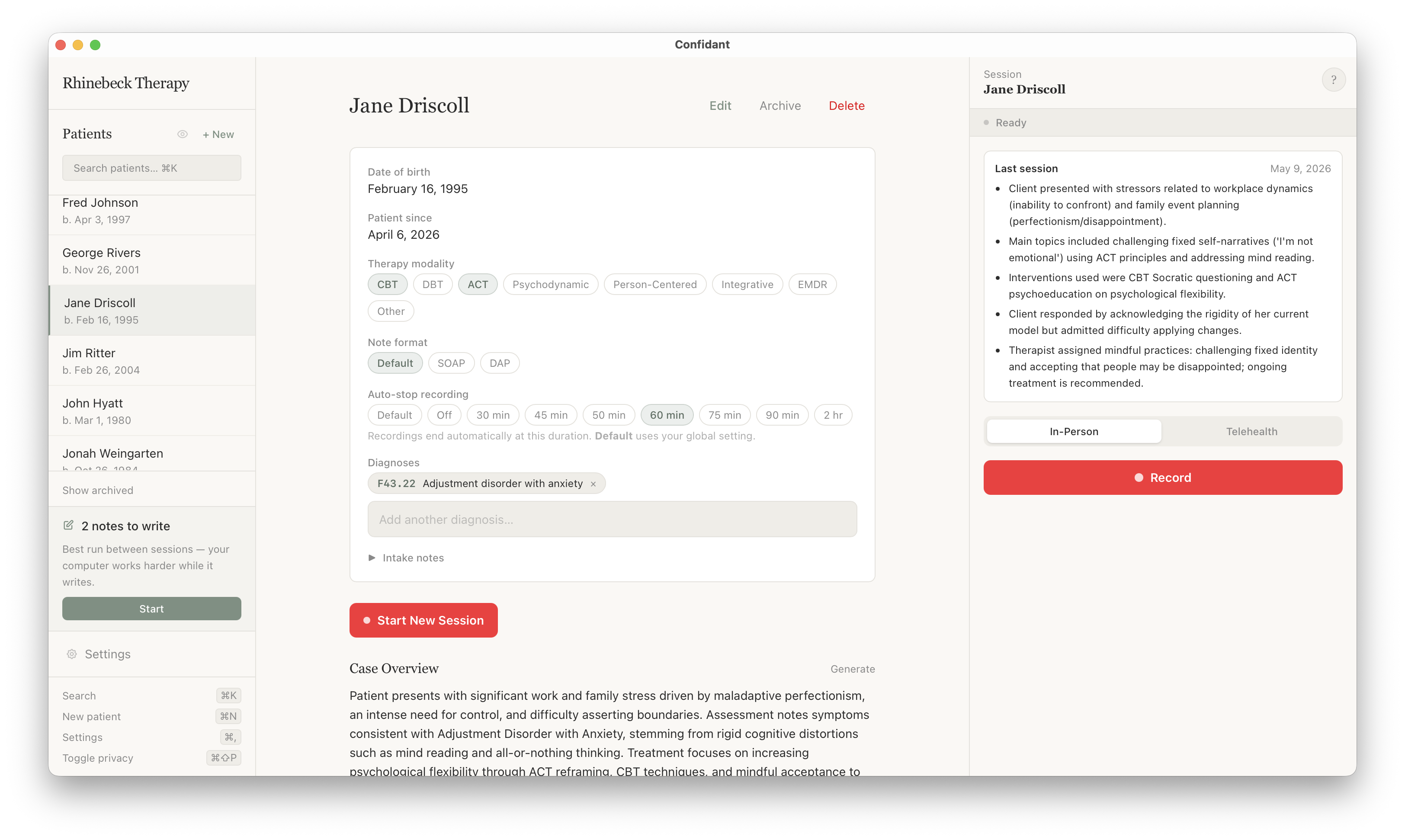
Confidant records, transcribes, and writes your SOAP, DAP, and BIRP notes around each client’s treatment goals, with local AI that runs entirely on your own computer. Your sessions never touch a cloud server or data center.
Works offlineAvailable for Mac and WindowsNo session limitBuy once or subscribe
Works offlineAvailable for Mac and WindowsNo session limitBuy once or subscribe
Why Confidant
Every other AI scribe sends your sessions to the cloud. Confidant doesn't.
Everything Confidant records, transcribes, and writes stays on your computer, using local AI. No cloud storage, no account. You choose how long recordings and transcripts are kept on your computer, or have them deleted the moment they're no longer needed.
Your session audio
Confidant
Recorded and transcribed on your own machine. The audio is encrypted, never leaves your computer, and is deleted instantly after transcription finishes.
Cloud AI scribes
Uploaded to their servers to be transcribed. The recording can then be kept, analyzed, or shared.
Note generation
Confidant
A local model drafts your SOAP, DAP, or BIRP note. Your note is encrypted, and the transcript is deleted once the note is done.
Cloud AI scribes
Your transcript is sent to a cloud LLM, where it can be logged and fed into future model training.
AI companies
Confidant
Thanks to local AI, no outside company (including us) or data center ever sees a session, so there's nothing to retain, train on, or sell.
Cloud AI scribes
The core of the product. Retention, training, and even resale of de-identified data can happen on their terms, not yours.
What's inside
More than a note generator.
A running record of every client, on your computer, that helps you walk into each session prepared.
Treatment goals
Enter each client's goals once. Every note ties the session to the goals it worked on, so your notes show progress.
Last-session recap
Open a client and see where you left off last time, before they sit down.
Case conceptualization
An overview of the client's trajectory across every session, generated on demand.
Notes in your style
SOAP, DAP, BIRP, GIRP, PIRP, or SIRP, from preset styles or your own prompts. Refine and regenerate until it's right.
Search every transcript
Find a moment or a theme across a client's entire history in seconds.
Locks and retention
Face ID or Touch ID to open. Auto-delete recordings and transcripts on your own schedule.
No more admin Fridays.When your last session ends, so does your workday.
After every session, 8 minutes for checking the mail.
Back every week
2.7 hrs
multi-night dinner prep
Back every year
123 hrs
3 weeks of vacation
Simple, honest pricing.
Subscribe monthly, or buy once and own it forever. No per-client fees, no hidden tiers.
Subscription
$29.99/month
USD, billed monthly
Everything Confidant does.
Unlimited sessions, unlimited clients
All updates included, always
Works fully offline
SOAP, DAP, BIRP, and more
Updates included
No separate update plan to buy. New software features are included as long as you're subscribed.
It's HIPAA-irrelevant, confirmed with our legal team. Because client data never leaves your device, there's nothing for a BAA to cover. Your existing security practices (a locked computer, FileVault/BitLocker, a strong password) are the whole story.
How do I know my client data stays on my computer?
You can verify it yourself. Run a free network inspector like Charles Proxy while Confidant is recording and generating a note. You'll see local traffic only: no audio, no transcript, nothing sent out. Here's what you'll see →
Can Confidant see my clients' data?
No. It never reaches us, so there's nothing for us to see, store, or hand over.
Do I need internet to use it?
No. Recording, transcription, and note generation all run locally. You can be on a train, in a coffee shop, or fully off the grid. Confidant works the same.
How is this different from Mentalyc, Heidi, or other AI scribes?
Those tools send your sessions to their servers, and their privacy policy decides what happens next. That can include using de-identified session data to train AI or sharing it with partners, and policies can change. Confidant has no servers at all, so there's nowhere for a session to go. And you can subscribe or buy it once, with unlimited notes either way.
What if my computer dies?
Use your normal backup practice (Time Machine, an encrypted external drive). Your notes live in a normal file on disk. You can back them up the way you back up anything else.
Will it work with my EHR?
Confidant generates finished notes you can copy into SimplePractice, TherapyNotes, Jane, or any other EHR. We don't integrate via API, which is the point: your notes never need to leave the app until you decide.
What if I don't like it?
The 14-day trial is free. If you buy and find it doesn't fit your practice within 30 days, email us. We'll refund you.